Introduction
Opening a large Revit model can involve much more than drawing the first visible view. Revit may need to read model data, rebuild relationships, process references, prepare graphics, and then display the initial view. Revit 2027.2 introduces Incremental Model Open as a Tech Preview intended to reduce how much of that work must happen before users can begin.
The feature changes the order of processing rather than simply making every part of the file faster. It gives priority to the information required by the starting view and processes more data later when a workflow requests it. That distinction is important when evaluating Autodesk’s early performance figures.
Quick Answer
Quick answer: Incremental Model Open can make the first usable view appear sooner in some large Revit 2027.2 models by processing the starting view first and handling additional data as needed. Autodesk reports up to roughly 1.5–2× faster model-open times and 60–80% less data processed at startup in some initial tests. Those figures are not guaranteed. Results depend on the model, linked content, visibility, complexity, and the selected starting view.
This is still a Tech Preview with known limitations. BIM teams should validate it in a controlled workflow before relying on it for production work.
How Revit Traditionally Opens a Model
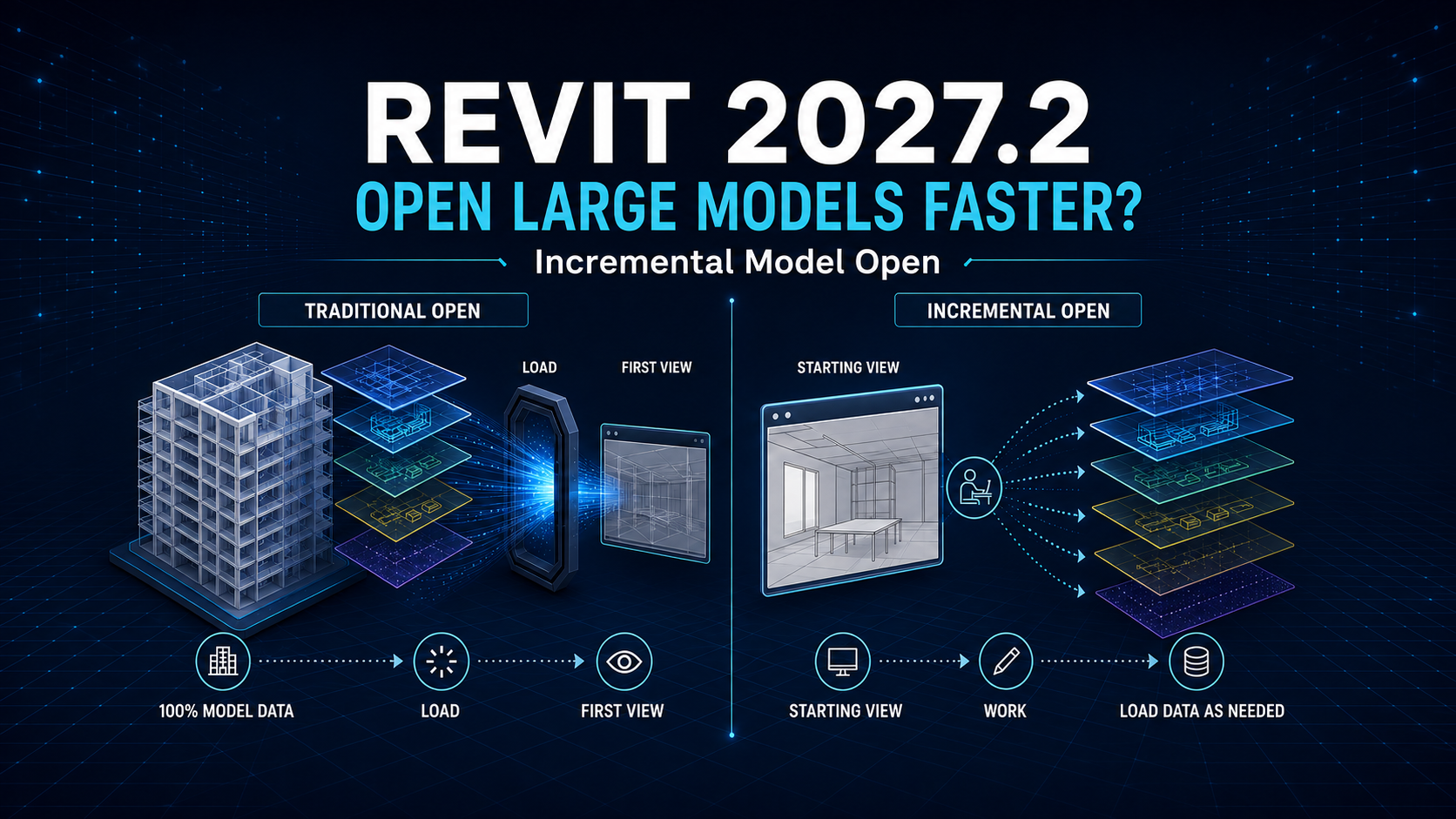
In the traditional model-open process, Revit reads the entire model into memory during startup, including information that may not be needed for the first task. The process can include reading data from disk, rebuilding element relationships and dependencies, processing linked and externally referenced content, generating internal graphics data, and drawing the initial view.
The time spent in each stage varies. A large file with complex visibility rules, extensive references, and detailed geometry can have a different bottleneck from a model whose main delay comes from another stage. This is why file size alone does not predict how much a project will benefit.
How Incremental Model Open Changes the Process
With Incremental Model Open enabled, Revit first processes the data required to create the starting view. Data that is not needed immediately can be processed later as the user opens views, runs tools, queries the model, or performs other operations.
The goal is to make time to first view depend more on the information needed for the first task and less on the total amount of information in the project. The feature does not eliminate later processing; it changes when some of that processing occurs.
Traditional vs Incremental Model Open
| Area | Traditional Model Open | Incremental Model Open |
|---|---|---|
| Startup scope | Reads the entire model into memory during open | Processes data required for the starting view first |
| Additional data | Processed broadly up front | Processed as later views and operations request it |
| Startup memory | Higher upfront demand | Potentially lower upfront demand |
| Main performance factor | More closely tied to overall model size and complexity | More closely tied to data required by the starting view |
| Cloud download and cache | Completed before open | Still completed before open; not shortened by this preview |
| Save and Sync to Central | Existing behavior | Not improved by Incremental Model Open |
How Much Faster Can It Be?
Autodesk’s initial testing showed up to approximately 1.5–2× faster model opening in some scenarios. It also showed 60–80% less data processed at startup in some tests. These are early observations, not a service-level promise or a result that every model will reproduce.
The outcome can change with model structure, linked content, visibility settings, project complexity, and the starting view. The greatest benefit is expected when reading and processing model data accounts for a significant share of the original open time. If another step dominates the wait, the total improvement may be smaller.
Why the Starting View Matters
The starting view defines the first set of information Revit must prepare. A lightweight drafting or detail view usually requires less model data than a large schedule or a complex 3D coordination view. Choosing a simpler starting view can therefore increase the opportunity for a faster first view.
A heavy starting view can reduce the advantage because Revit still has to process whatever that view needs. For a fair test, teams should record the chosen starting view and keep it consistent between traditional and incremental runs.
How to Enable Incremental Model Open
Close any open models, then use this path in Revit 2027.2:
File > Options > General > Incremental Model Open
Review and accept the Autodesk Tech Preview Terms and Conditions when prompted. The option is an application-level setting, is disabled by default, and cannot be changed while a model is open. Once enabled through the interface, it remains active for the current Revit session.
It can also be enabled in Revit.ini before restarting Revit:
[Misc]
IncrementalOpenDynamic=1
Cloud Model Download Limitation
Incremental Model Open does not shorten the time required to download and locally cache a cloud-hosted model. The cloud model is still fully downloaded and cached before opening. The current preview reduces the amount of model data processed into memory during the Revit session; it does not stream the model directly from the cloud.
For cloud workflows, separate download time from Revit processing time when measuring results. A slow connection or an empty local cache can otherwise hide an improvement in the model-processing stage.
How It Differs from Worksets and Linked Models
Opening a model with selected worksets closed reduces the content loaded by excluding those worksets. That approach depends on how the project has been organized and on users choosing what to open. Incremental Model Open instead processes model information on demand, beginning with the data required for the first view.
The feature does not replace worksets or linked models. Those tools still serve collaboration, model organization, and discipline-coordination purposes. Incremental opening is intended to reduce the need to divide a project solely to control model-open performance or memory use.
What Happens When You Open Additional Views?
Opening another view may require Revit to process data that was not needed by the starting view. A large coordination or 3D view can therefore take more processing than a small drafting or detail view. Broad operations such as printing a large sheet set may also move some processing from startup to a later point in the session.
Once data has been processed, it remains available during the current session. Closing a view does not currently cause Incremental Model Open to unload that processed data automatically.
Current Tech Preview Limitations
Incremental Model Open is experimental and has known limitations. Autodesk currently identifies several areas that require particular care:
- Editing a linked model that is already loaded in an open host model from a separate Revit session is not supported in some local and file-based workflows.
- Updating shared coordinates for a linked model while that link is open in the host model is not supported.
- Linking an IFC file is not supported when a corresponding RVT file already exists in the same location.
- Because data is read on demand from the model database, losing access to the model is not yet handled gracefully and may cause a crash.
- Specific linked-model save, sync, and reload workflows have additional restrictions described in Autodesk Help.
The feature also does not improve Save or Sync to Central performance. Autodesk explains that those operations already work incrementally and are not affected by this preview. Teams should read the current limitations before testing, because Tech Preview behavior may change.
Who Should Test It First?
The strongest candidates are teams working with large, detailed projects whose current open time is dominated by reading and processing model data. Teams exploring focused add-in or Autodesk Platform Services Automation API workflows may also be interested because those operations may request only a limited subset of project information.
A team that depends heavily on unsupported linked-model, shared-coordinate, or IFC workflows should evaluate the limitations before enabling the preview. Testing should begin with a controlled model and a reversible process rather than an assumption that the reported range will apply everywhere.
A Simple BIM Team Test
- Select a representative model approved for testing and record its Revit version, starting view, link state, and cache condition.
- Open it with the conventional process several times and measure time to first usable view.
- Close all models, enable Incremental Model Open, and repeat the same test with the same starting view and conditions.
- Compare time to first view, startup memory behavior, and the delay when opening the team’s common follow-up views.
- Repeat with a lightweight starting view and a data-heavy coordination view to see how the first task changes the result.
- Document any linked-model, shared-coordinate, IFC, connectivity, save, or sync behavior before considering wider use.
This kind of test distinguishes a faster first view from a faster entire session. It also helps the team evaluate whether later on-demand processing fits its real working pattern.
What This Means for the Future of Revit
Autodesk describes Incremental Model Open as an early step in a broader scalability strategy. Longer-term goals include reading model data incrementally, working with subsets without downloading and caching an entire model locally, and eventually streaming model data directly from the cloud.
Those goals should not be confused with the current Revit 2027.2 preview. Today’s feature changes in-session processing after the model is available locally. Direct cloud streaming and reduced cloud-cache requirements are future directions, not current capabilities.
Final Takeaway
Incremental Model Open is promising because it targets the moment users care about first: reaching a usable starting view. Autodesk’s early results—up to roughly 1.5–2× faster opening and 60–80% less startup data processing in some tests—show potential, especially for large models with lightweight starting views.
It is not a universal 2× speed switch. It does not accelerate cloud download, Save, or Sync to Central; it does not replace worksets or links; and later views can still trigger additional processing. Because it remains a Tech Preview with workflow limitations, the practical answer is to test it carefully, measure the complete workflow, and verify every result before production adoption.