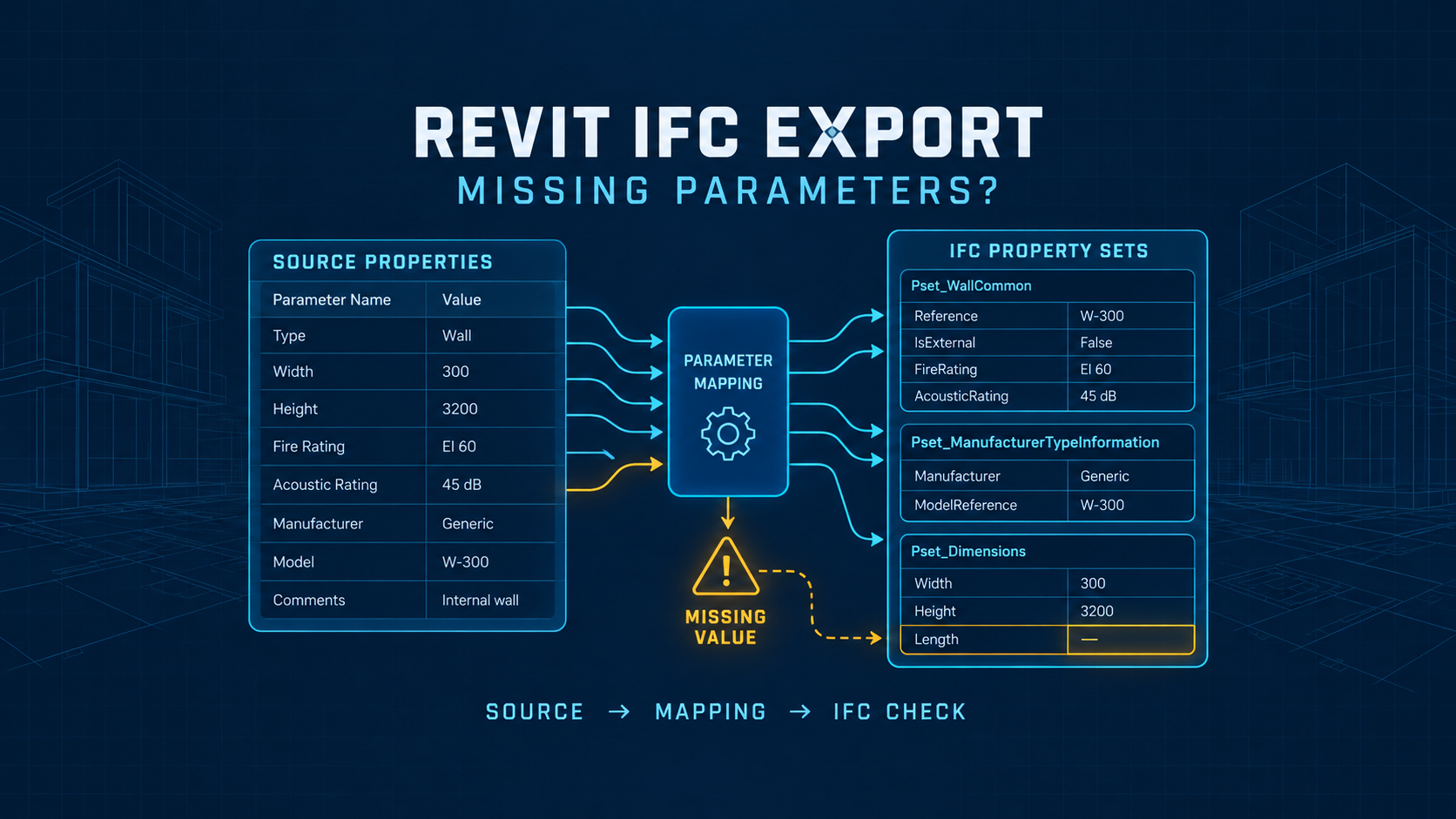
An IFC model can look correct and still be missing the information another BIM team needs.
A wall may appear in the right location, but a custom review field is absent. A type parameter may show up in a different place than expected. Or the new IFC mapping dialog in Revit 2027 may not list a parameter that clearly exists in the source model.
These symptoms have different causes. Exporting every Revit property or reinstalling the exporter is not a reliable first response.
This guide provides a repeatable way to isolate the problem, a small synthetic mapping example, and an evidence checklist you can use before sending an IFC deliverable. The example is for demonstration and has not been run as a Revit benchmark.
Quick answer: where to check first
If a parameter is missing from IFC, inspect the following chain in order:
Source value → exported IFC class → export property-set settings → mapping → instance/type location → IFC file.
Start with one known element. Verify its parameter contains a value, record the name exactly, identify whether it is an instance or type parameter, and inspect the exported IFC class. Then confirm the intended property set is enabled and that the correct Revit parameter is mapped to the right IFC property.
If the new interface does not show the parameter, check the installed Revit build and exporter version. A properly formatted user-defined property set TXT file can be an alternative where supported; it is not the same file as a Revit Shared Parameters definition.
Finally, reopen the actual IFC output and compare the property name and value against your source record. A successful export dialog does not mean the data exchange passed validation.
Why correct IFC geometry can have missing parameters
Revit and IFC do not store data in identical structures. Revit groups properties on elements, types, families, and project-level objects. IFC organizes them by entities, types, attributes, and property sets (Psets). Export settings determine which part of that information becomes part of the delivered IFC.
Consider a wall with these two populated Revit instance values:
| Revit source field | Synthetic test value | Intended IFC field |
|---|---|---|
| Comments | QA_ALPHA | BTS_WallQA.ReviewComment |
| Mark | BTS-W-001 | BTS_WallQA.ReviewMark |
Even if the wall geometry exports, the receiving viewer cannot display BTS_WallQA unless the relevant custom property set is created and applied to the IFC entity during export.
This is why it helps to distinguish three questions: Is the source data populated? Did the exporter map it? Is the receiving tool displaying the right IFC object and property set?
Step 1: isolate one element and record the source data
Create a working copy of a model or use a clean, disposable test project. Do not experiment on the delivery copy of a production model.
For one representative element, record the following:
- Revit version, build, and IFC exporter version
- Category and element identifier
- Exact source parameter name, value, and data type
- Whether the value is on an instance or its type
- Target IFC schema and entity/class
- Intended IFC property set and property name
- Export setup used and the output IFC filename
Use one clear diagnostic question: Does the value exist in the source model before exporting?
If the source value is blank, you have a source-data issue before you have an IFC mapping issue. If it is populated, proceed to the next link in the chain.
Step 2: inspect the IFC class and property-set settings
In Revit, open File → Export → IFC, then open Modify Setup for the selected configuration. Review the available property-set and parameter-mapping controls. Names and layout can differ by build.
Three kinds of output are easy to confuse:
| Setting or source | What it does | Appropriate use |
|---|---|---|
| IFC common property sets | Produces supported standardized IFC properties | Data exchanges expecting standard Psets |
| Revit property sets | Exports Revit-oriented property groups | Diagnostic comparison or specifically requested deliverables |
| User-defined property sets | Maps selected source values into specified custom Psets | A controlled project-specific exchange requirement |
Enabling Revit property sets may help determine whether a parameter is exportable, but it may also produce more properties than the receiving team needs. Use this as a diagnostic rather than automatically making it your final delivery configuration.
Next, open the IFC output in a separate viewer or inspection tool and check the actual IFC entity type. Do not assume a Revit category name and the target IFC class are always identical. A mapping targeting IfcWall, for example, must be checked against the entity/class represented in the output.
Step 3: understand the Revit 2027 mapping interface
Revit 2027 prominently documents a graphical interface for managing IFC parameter mappings. In the IFC export workflow, users can select or manage mapping setups and custom property sets, including importing and exporting TXT definitions.
An Autodesk help page also describes an enhanced user-defined mapping workflow as available beginning with Revit 2026.3, while another Autodesk support article describes the enhanced IFC parameter mapping in Revit 2027. Because the exact phrasing differs between sources, verify the controls in your installed build rather than assuming that every Revit 2026/2027 installation exposes the same UI.
The key principle is unchanged: a source parameter must be connected to the intended IFC property through a configuration understood by the exporter.
Step 4: try a small custom TXT property-set mapping
This is an illustrative file created for BuildTech Scope. It uses only built-in parameter labels and fictional values. It was structurally checked for tab separators but was not executed in Revit or verified against an exported IFC file.
The companion file BTS_WallQA_sample_pset.txt contains the following tab-separated definition (displayed here as a readable example):
PropertySet:	BTS_WallQA	I	IfcWall
	ReviewComment	Text	Comments
	ReviewMark	Text	Mark
The first row defines the custom IFC property set (BTS_WallQA), uses I in the legacy instance/type field as recommended by Autodesk for Revit 2024.1 and later, and targets the IFC class IfcWall. In newer exporter versions, I should not be treated as an exclusive instance-property selector. When working with type parameters, verify the relevant IFC type classes, exporter settings, and the resulting IFC data. Each following row specifies the IFC output property, data type, and source Revit parameter. The file uses actual TAB characters—not spaces—for column separators. It also uses PropertySet: without a leading #, consistent with Autodesk’s active-file examples; lines beginning with # in reference templates can be comments.
How to run a safe check:
- Create two basic test walls in a disposable Revit model.
- Populate instance
CommentsandMarkwith distinct fictional values. - Check that both walls export to the IFC class targeted by the mapping. Adjust the test mapping if your exporter uses a different class.
- Configure the user-defined property set through the supported IFC export setup or import the TXT into the enhanced mapping interface where supported.
- Export an IFC file with the relevant Pset enabled.
- Inspect each IFC wall and look for
BTS_WallQAand its two mapped property values. - Record the actual output and exporter version. Do not assume the sample succeeded merely because the export completed.
Important: If your installed exporter behaves differently, start from the Autodesk template distributed for that exporter. Do not copy an unverified example directly into company standards.
Step 5: compare expected and actual output using a simple test matrix
A small matrix makes it easier to determine whether the issue is global or restricted to certain elements.
| Synthetic element | Revit Comments | Revit Mark | Expected IFC review properties |
|---|---|---|---|
| Wall A | QA_ALPHA | BTS-W-001 | ReviewComment=QA_ALPHA; ReviewMark=BTS-W-001 |
| Wall B | QA_BETA | BTS-W-002 | ReviewComment=QA_BETA; ReviewMark=BTS-W-002 |
These are expected results, not results measured in Revit. A missing BTS_WallQA on both walls points first toward the mapping or IFC class configuration. If only one wall fails, compare its source value, type/instance binding, export scope, and resulting IFC class before changing the entire template.
The included IFC_VALIDATION_WORKSHEET.md provides a reproducible record of what to capture, including expected versus actual values and a pass/review/fail decision. It does not impose an arbitrary engineering tolerance or guarantee export compliance.
Step 6: avoid the Shared Parameters TXT confusion
A Revit Shared Parameters TXT file and an IFC user-defined property set TXT file are not interchangeable.
The shared parameter definition governs which parameters can be created or shared across Revit projects and families. The IFC property-set file governs where selected source properties should appear in IFC.
Autodesk documents a case where users selected their Revit shared parameter definition file under the IFC export option for user-defined property sets. The result did not group exported parameters as intended. The remedy was to create and select the correct IFC property-set definition file.
If your source parameter is shared but the custom Pset is missing, confirm the file referenced by the export setup is the IFC Pset mapping file, not the shared parameter library.
Step 7: find type properties where they actually belong
An IFC property can be associated with an element occurrence or with its type. Autodesk documents cases where users expected instance and type values in one custom Pset but saw separate property sets instead.
That does not automatically mean the parameter disappeared. Check the type entity and the relevant export option for using type properties in instance Psets where supported.
Use this diagnosis pattern:
- Instance value present in Revit, missing in IFC: inspect element occurrence and instance mapping.
- Type value present in Revit, missing in IFC: inspect the IFC type object, type mapping, and exporter options.
- Same Pset name appears twice: examine whether the properties have been separated by instance/type association.
The receiving application’s property tree may display these objects differently. Verify the IFC relationship, not just the visual grouping in one viewer.
Step 8: recognize the known Revit 2027 mapping limitations
In an August 2026 Autodesk Community discussion, a user reported missing property choices in the newer interface, and an Autodesk representative acknowledged an issue with empty lists for certain IFC classes. That statement describes a reported and acknowledged behavior at that time, not a guarantee that every current build remains affected.
Autodesk also published a support article describing a Revit 2027 case where different source parameters from different Revit categories cannot be mapped to the same IFC target property for elements sharing an IFC class through the new mapping feature.
The documented workarounds include using distinct property or Pset names. Autodesk also mentions a Unicode blank-space variation, but invisible characters are difficult to audit and compare in downstream systems. For maintainable information exchange, prefer unambiguous, visibly different property names when they meet the client’s requirements.
Before relying on a workaround, check the most recent official updates and test the resulting structure in the receiving workflow. Do not tell a client that a known limitation has been fixed unless your exact supported build or official release documentation confirms it.
Step 9: troubleshoot a missing Pset without changing everything
The following decision table helps narrow the fault quickly:
| Observation | First thing to inspect | Why |
|---|---|---|
| Source field is blank | Revit parameter binding and value | IFC cannot carry the intended source value if it is absent |
| Field exists but custom Pset is absent everywhere | Pset enabled, TXT structure, targeted IFC class | Indicates configuration more than isolated element data |
| Pset is present but the wrong value appears | Exact source mapping name and duplicate mappings | A different parameter may be supplying the target property |
| Type value is missing on the instance | IFC type entity and type/instance option | The data may be attached to a different IFC object |
| Mapping UI has an empty parameter list | Revit build, exporter version, Autodesk known issue, TXT method | Avoid assuming every missing UI choice means the source data is corrupt |
| TXT mapping produces nothing | TAB separators, UTF-8, header PropertySet:, no unintended comments | Autodesk has documented formatting-related failures |
| One IFC viewer shows no value | Check another capable inspection method or raw IFC relationship | Viewer presentation and underlying IFC content can differ |
Change one variable at a time and record the resulting IFC file. This matters because enabling multiple export options simultaneously may appear to fix the result without identifying the actual cause.
Release-version check before a production export
Before treating an online workaround as current, check:
- Exact Revit 2027 build
- Installed IFC exporter/add-in version, if applicable
- Exported schema (for example, IFC2x3 or IFC4)
- The IFC entity actually used for the element
- Whether the issue is explicitly listed in current Autodesk release notes
Revit 2027.3’s published resolved-issues list includes IFC-related fixes such as exporting to network folders. That alone is not evidence that every parameter-mapping issue was fixed. Match the specific defect to explicit release evidence or to your own repeatable test on the target build.
A final IFC handoff checklist
Before releasing the deliverable, ask:
- Is the exchange requirement written as IFC class + Pset + property + data type + expected source?
- Are source values populated for the selected test elements?
- Is the export setup/version saved or recorded?
- Have instance and type values been checked separately?
- Were at least two test instances compared, rather than one attractive screenshot?
- Has the actual output been inspected by a method suitable for the receiving team?
- Are any failures, unsupported properties, and exceptions documented?
The goal is not to produce the maximum number of properties. It is to deliver a predictable, verifiable subset of information that the next team can use.
FAQ
Does Revit 2027 support legacy TXT property-set definitions?
Autodesk documents the ability to import/export existing TXT definitions in the enhanced mapping workflow. Exact controls depend on the installed release and exporter; consult its matching help and template.
Why is a shared parameter missing even when geometry exports?
It may not have a populated source value, the IFC class or property set may not match, or the expected value may belong to the type instead of the instance. Confirm each link in the mapping chain.
Does enabling Export Revit Property Sets fix every missing parameter?
No. It may be useful for diagnosis but can add irrelevant or duplicated information. A targeted validated Pset is usually easier to audit for a defined exchange requirement.
Is every Revit 2027 IFC parameter-selection problem an Autodesk bug?
No. Autodesk has acknowledged specific issues, but other problems arise from mapping choices, source values, formatting, and entity associations. Check the specific build and reproduce the issue.
Can two different Revit parameters map to one IFC property?
There are documented limitations in some Revit 2027 UI workflows involving different source parameters and the same IFC class/target property. Test your requirement against the current build and use clearly distinguished Pset/property names where appropriate.
Final takeaway
A visually correct IFC is not necessarily an information-complete IFC.
Troubleshoot missing Revit parameters by following the data from its source value to its IFC entity, mapping setup, property set, and actual exported value. Use small test models and an evidence matrix before rolling a workaround into an office-wide template.
For a related downstream coordination comparison, see Navisworks vs Autodesk Forma Model Coordination. The best viewer or coordination tool is only as useful as the property data it receives.
Editorial transparency: This guide is based on Autodesk documentation and original synthetic examples. BuildTech Scope has not claimed a hands-on execution or measured compatibility result for the downloadable sample in Revit 2027.
Download the synthetic example and validation worksheet
The validation worksheet is provided in full below. Both assets are synthetic demonstration materials, not Revit-tested export results.
Synthetic validation worksheet
Purpose: Evidence checklist for a controlled, disposable test model. No actual Revit test result is supplied.
Revit version/build: __________________________
IFC Exporter version: __________________________
Export schema (IFC2x3 / IFC4 / etc.): __________________________
Source RVT test file (fictional, no customer data): __________________________
Pset TXT filename/version: BTS_WallQA_sample_pset.txt / __________________________
Output IFC filename: __________________________
Viewer / inspector and version: __________________________
Baseline test definitions (not measured outputs)
| Test element | Source category | Source Comments | Source Mark | Target entity | Target Pset |
|---|---|---|---|---|---|
| Wall A | Walls | QA_ALPHA | BTS-W-001 | IfcWall (confirm actual) | BTS_WallQA |
| Wall B | Walls | QA_BETA | BTS-W-002 | IfcWall (confirm actual) | BTS_WallQA |
Export evidence to record
| Item | Expected | Actual output | PASS / REVIEW / FAIL |
|---|---|---|---|
| Wall A IFC entity | Mapped target class is correct | ||
Wall A ReviewComment | QA_ALPHA | ||
Wall A ReviewMark | BTS-W-001 | ||
| Wall B IFC entity | Mapped target class is correct | ||
Wall B ReviewComment | QA_BETA | ||
Wall B ReviewMark | BTS-W-002 | ||
| Pset name | BTS_WallQA | ||
| Data type | Text for both fields | ||
| Repeatability | Same setup and source should yield matching property data |
Fault isolation checklist
- [ ] Source values checked before export
- [ ] Instance/type binding identified
- [ ] Exported IFC entity class checked
- [ ] Exact export configuration recorded
- [ ] User-defined Pset setting enabled and applied
- [ ] TXT file parsed or imported without unsupported columns or stray comments
- [ ] Output inspected in IFC viewer or capable inspection method
- [ ] Actual property name, type, and value compared with source
- [ ] Evidence screenshot or data report saved from synthetic test only
- [ ] Any missing mapping investigated one variable at a time
Important: These rows are expected test values, NOT observed results and NOT engineering acceptance criteria. Use current Autodesk guidance and the IFC exporter’s own template for final project standards.
Official sources
- Autodesk Revit 2027 Help — IFC Parameter Mapping
- Autodesk Revit Help — Manage IFC Export User Defined Property Sets
- Autodesk Revit Help — Export User Defined Properties to IFC
- Autodesk Support — Revit IFC export cannot map different parameters to the same IFC property
- Autodesk Support — Exported IFC parameters not grouped despite selecting user-defined property sets
- Autodesk Support — Instance and type parameters exported to separate custom property sets
- Autodesk Support — Custom property-set tab fails to export because of TXT formatting
- Autodesk Community — IFC mapping parameter limitations; Autodesk representative response, August 2026
- Autodesk GitHub — DefaultUserDefinedParameterSets.txt reference
- Autodesk Revit 2027.3 — Issues Resolved