If you work with Autodesk cloud tools in 2026, the naming can be surprisingly confusing.
You may open an older tutorial that refers to Autodesk Construction Cloud, follow an Autodesk support article that says Autodesk Forma, see Autodesk Docs referenced as Forma Data Management, and still have an active BIM 360 project at the same time.
These are not necessarily different systems.
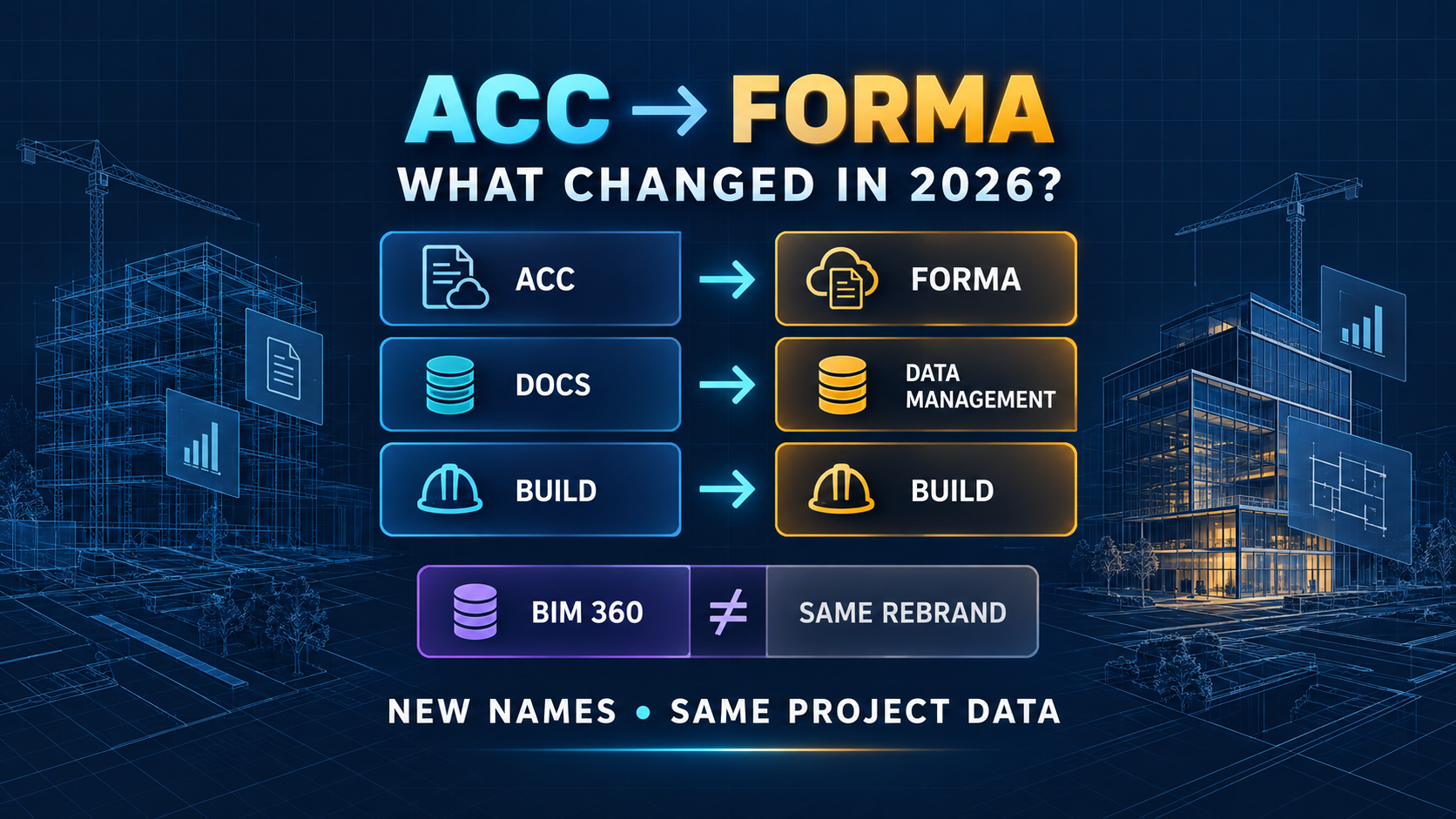
On March 24, 2026, Autodesk Construction Cloud became part of the Autodesk Forma industry cloud. Several products were renamed, but Autodesk described the transition as a platform and branding evolution rather than a forced technical migration.
For BIM and AEC teams, the important question is therefore not simply, “What is the new name?”
It is:
What actually changed, what stayed the same, and what should you do with existing ACC or BIM 360 projects?
Quick Answer
Autodesk Construction Cloud, commonly called ACC, is now represented within the Autodesk Forma industry cloud.
The most visible changes are product names:
| Previous name | Current Forma name |
|---|---|
| Autodesk Construction Cloud | Autodesk Forma |
| Autodesk Docs | Forma Data Management |
| BIM Collaborate Pro | Forma Design Collaboration |
| Autodesk Build | Forma Build |
| Autodesk Takeoff | Forma Takeoff |
| Autodesk Estimate | Forma Estimate |
| Model Coordination | Forma Model Coordination |
The rebrand did not require ACC customers to move their project data simply because the platform name changed.
Autodesk stated that existing workflows, APIs, integrations, licensing, login experiences, and project data would remain intact as part of the transition.
BIM 360 is a separate question.
Autodesk currently says the broader BIM 360 platform does not have a planned end-of-life date, although it is no longer receiving new features and Autodesk recommends starting new projects in Forma.
Some older BIM 360 products, however, have already been retired.
That distinction matters.
Why Did Autodesk Rename ACC to Forma?
Autodesk’s longer-term goal is broader than construction document management.
Forma is being positioned as an industry cloud that connects planning, design, construction, and operations.
That means the platform needs to connect workflows that historically lived in separate products:
- early planning and site design
- Revit building design
- Civil 3D infrastructure engineering
- cloud model coordination
- construction management
- project data
- digital twins and operations
Autodesk Construction Cloud covered an important part of that lifecycle, especially construction collaboration and project management.
By bringing ACC capabilities into Forma, Autodesk can place those construction workflows inside the same broader cloud strategy used for design and connected project data.
This is why the change is more than a new logo, even though most existing ACC users did not need to migrate their projects when the branding changed.
Autodesk Docs Is Now Forma Data Management
One of the most important naming changes is Autodesk Docs.
The product is now called Forma Data Management.
Its role is still familiar: it acts as the common data environment for project files, models, reviews, permissions, versions, and related project information.
For many BIM teams, this is the cloud location that sits behind workflows involving Revit, Civil 3D, Desktop Connector, Model Coordination, and other Autodesk tools.
This creates an important search problem.
Older documentation, internal BIM manuals, screenshots, training videos, and support discussions may still say “Autodesk Docs.”
Current Autodesk pages may say “Forma Data Management.”
When troubleshooting, it is therefore useful to search both names.
For example:
Autodesk Docs permissions
and
Forma Data Management permissions
may lead to different documentation even though they relate to the same modern workflow.
BIM Collaborate Pro Is Now Forma Design Collaboration
BIM Collaborate Pro has also been renamed.
The current name is Forma Design Collaboration.
This is especially relevant for teams using cloud-based design collaboration with Revit, Civil 3D, or Plant 3D.
The branding changed, but the important workflow question remains the same:
Which subscription gives each user the collaboration capabilities required for the project?
Do not assume that every product containing the word “Forma” includes every design collaboration feature.
Subscription entitlement still matters.
For BIM managers, updating internal documentation with both the current and former names can reduce confusion during this transition period.
A useful format is:
Forma Design Collaboration (formerly BIM Collaborate Pro)
That helps both experienced users and new staff find the same workflow.
Autodesk Build Is Now Forma Build
Autodesk Build is now Forma Build.
Its role remains centered on construction management workflows such as issues, RFIs, submittals, forms, field workflows, project controls, and related construction processes.
This naming change matters because users searching older documentation may still encounter the Autodesk Build name.
Again, the safest approach is not to assume that a renamed product has become a completely different application.
Check the feature, subscription, and project environment rather than relying only on the product label.
Did ACC Projects Need to Be Migrated?
No—not because of the ACC-to-Forma rebrand itself.
Autodesk stated that the transition did not require a data migration.
Existing customer data, integrations, workflows, login experiences, licensing, and APIs were intended to remain intact.
That is different from deliberately moving data between two separate projects, hubs, regions, or legacy platforms.
A project migration is still a real technical operation.
Autodesk’s current support documentation notes that transferring information between BIM 360 or Forma projects can have limitations. Files can often be copied, but metadata such as issues, markups, revision history, activity logs, and certain collaboration relationships may not transfer automatically.
So there are two very different scenarios:
ACC becomes Forma: Brand/platform transition — no project migration required simply because of the rename.
BIM 360 project moved to a new Forma project: Actual data migration — requires planning and may have limitations.
Confusing these two scenarios can create unnecessary migration work.
Is BIM 360 Discontinued?
Not as a complete platform.
This is one of the most important distinctions in 2026.
Autodesk currently says there are no plans to retire the broader BIM 360 platform.
However, Autodesk also says BIM 360 will no longer receive new features and recommends using Autodesk Forma for new projects.
At the same time, several older BIM 360 products have reached end of life.
For example, BIM 360 Glue reached end of life on July 31, 2026.
That means the statement “BIM 360 is dead” is too broad.
A more accurate view is:
BIM 360 platform: existing projects can still exist.
New development: Autodesk is concentrating future workflows in Forma.
Specific legacy BIM 360 products: some have already been retired.
For companies with long-running infrastructure or building projects, this distinction can be important because an existing BIM 360 project does not automatically need to be abandoned just because newer Autodesk documentation uses the Forma name.
What Does This Mean for Revit Users?
For Revit users, the biggest practical impact is terminology.
Cloud worksharing, project access, permissions, and shared project data increasingly appear under Forma branding.
If an older BIM manual tells users to open Autodesk Docs or BIM Collaborate Pro, the equivalent modern names may now be Forma Data Management and Forma Design Collaboration.
The underlying project should not be manually moved just to make the name match a current tutorial.
First confirm whether the documentation is referring to a renamed ACC workflow or a genuinely different BIM 360 environment.
What Does This Mean for Civil 3D Users?
Civil 3D users are likely to see the Forma name more often over the next several releases.
Autodesk announced at AU 2026 that Civil 3D will become a Forma Connected Client, while the Civil 3D Cloud Connector for Autodesk Data Exchange is already available.
That makes understanding the Forma platform more important for infrastructure teams.
However, Forma does not mean Civil 3D is being replaced.
Civil 3D remains the detailed engineering environment for alignments, profiles, corridors, surfaces, pipe networks, and related infrastructure design.
Forma increasingly provides connected project context, data, and collaboration around those detailed engineering workflows.
What Does This Mean for Navisworks Users?
Navisworks also remains important.
Forma Model Coordination provides cloud-based aggregation, automatic clash workflows, shared issues, and continuous coordination around published models.
Navisworks Manage remains valuable when teams need highly controlled clash testing, custom tolerances, search sets, TimeLiner workflows, detailed reporting, and desktop-based investigation.
The ACC-to-Forma change does not mean Navisworks has been replaced.
Instead, the current Autodesk ecosystem increasingly supports a hybrid workflow:
Forma Model Coordination → shared cloud coordination
Navisworks Manage → advanced clash investigation and controlled testing
What Should BIM Managers Update?
The most useful response to the rebrand is not migrating everything.
It is updating terminology and governance.
Start with internal BIM documentation.
Where an SOP says “Autodesk Docs,” consider updating it to:
Forma Data Management (formerly Autodesk Docs)
Where training says “BIM Collaborate Pro,” use:
Forma Design Collaboration (formerly BIM Collaborate Pro)
Also review:
- onboarding documents
- BIM execution plans
- screenshots
- internal training videos
- help-desk articles
- software entitlement guides
- automation documentation
- integration diagrams
Do not rename API endpoints, scripts, folder locations, or technical integrations only because a marketing name changed.
Verify the actual technical requirement first.
A Practical 2026 Decision Guide
If your project already runs successfully in the former ACC environment, the Forma rebrand alone is not a reason to migrate it.
If you are starting a new project, use the current Forma terminology and current Autodesk guidance.
If you operate an existing BIM 360 project, evaluate that environment separately from the ACC-to-Forma branding change.
If you depend on a retired BIM 360 product such as Glue, verify the Autodesk transition guidance for that specific product.
And if you are building internal software or integrations, check current APS documentation rather than assuming branding changes also changed APIs.
FAQ
Is Autodesk Construction Cloud gone?
The ACC brand has been absorbed into Autodesk Forma, but the underlying construction workflows were not simply deleted. Autodesk describes the change as bringing ACC capabilities into the Forma industry cloud.
Is Autodesk Docs gone?
The current product name is Forma Data Management.
Older documentation may still refer to Autodesk Docs.
Do I need to move my ACC projects to Forma?
No migration is required solely because ACC became part of Forma.
Moving between separate BIM 360 or Forma projects is a different process and may involve migration limitations.
Is BIM 360 the same as Forma?
No.
BIM 360 is the earlier cloud platform generation.
Autodesk Forma includes the platform previously known as Autodesk Construction Cloud and is where Autodesk is concentrating newer connected AECO workflows.
Is BIM 360 being shut down?
Autodesk currently says there is no planned end-of-life for the broader BIM 360 platform, although it will not receive new features and new projects are recommended to start in Forma.
Some individual legacy BIM 360 products have already been retired.
Did the ACC-to-Forma change break APIs?
Autodesk stated that the rebrand itself did not change existing APIs or integrations.
Developers should still monitor Autodesk Platform Services documentation for separate API updates or breaking changes.
Final Takeaway
The easiest way to understand Autodesk’s cloud naming in 2026 is to separate branding changes from platform migrations.
Autodesk Construction Cloud becoming part of Forma was primarily a platform and product naming transition for existing ACC customers.
Autodesk Docs became Forma Data Management.
BIM Collaborate Pro became Forma Design Collaboration.
Autodesk Build became Forma Build.
But BIM 360 remains a separate legacy platform question, and moving a project from BIM 360 to Forma is not the same thing as the ACC rebrand.
For BIM teams, the practical strategy is simple:
Learn the new names, preserve the old names in documentation where they help users search, and migrate data only when there is a real project or platform reason to do so.
That approach avoids unnecessary disruption while preparing teams for Autodesk’s increasingly Forma-centered AEC ecosystem.
Official Sources
- Autodesk Construction Cloud is now Autodesk Forma — Autodesk News, March 24, 2026
- Autodesk Construction Cloud to Join Autodesk Forma — Autodesk News, February 25, 2026
- Get to know the new Autodesk Forma Industry Cloud — Autodesk Platform Services, March 24, 2026
- Clarification on BIM 360 Glue, BIM 360 End of Life, Autodesk Docs, Autodesk Forma, and Product Transition — Autodesk Support, May 20, 2026
- Is there an end of life (EOL) for BIM 360 planned? — Autodesk Support, August 12, 2026
- How to migrate data from one BIM 360 or Autodesk Forma project to another — Autodesk Support, April 7, 2026
- How Autodesk Forma and AI are advancing a more connected future for AEC — Autodesk News, September 15, 2026